
.png)

TweetPeek vs Tweepi: Which Tool Is Better for Growing on X (Twitter)?
If you’re comparing TweetPeek vs Tweepi, you’re probably trying to solve the same core problem: grow your X (Twitter) audience with real, relevant people, without spending hours every week manually searching, following, and cleaning up your following list.
The tricky part is that these tools take different approaches. One is built as a browser extension that lives right inside X. The other is more of a dashboard-style growth tool that works through recommendations, discovery, and cleanup.
In this guide, we’ll break down what each tool is best for, how their growth features differ, what “follow management” looks like in practice, and how to choose based on your goals.
Tools covered in this guide
TweetPeek vs Tweepi: At-a-glance comparison
Quick takeaway
- Pick TweetPeek if you want a browser extension experience inside X, with strong Smart Follows + Smart Unfollows that helps you stay consistent without being spammy.
- Pick Tweepi if you want a more classic “growth tool” flow built around recommendations, hashtag/user targeting, and account cleanup with stats.
What each tool is trying to help you do
Before features, it helps to know the “job” you’re hiring the tool for:
If your biggest pain is finding the right people to follow
You want targeting, relevance, and some guardrails so you’re not following random accounts.
If your biggest pain is cleaning up your following list
You want to quickly spot non-followers, inactive accounts, or accounts that no longer match your niche, then decide whether to keep, engage, or unfollow.
If your biggest pain is staying consistent
You want a system that makes growth actions easy to repeat (without needing a big weekly “maintenance day”).
That’s where TweetPeek and Tweepi start to separate.
How TweetPeek works
TweetPeek (Browser Extension for X)
TweetPeek is built as a browser extension for X (Twitter), so it’s designed to work while you’re actually on the platform, scrolling, checking profiles, and deciding who you want to connect with.
It focuses heavily on two areas:
- Smart Follows (growth + discovery)
- Smart Unfollows (cleanup + control)
It also includes scheduling and AI help for content, but those are secondary compared to follow management.
TweetPeek (Top pick for follow management inside X)

TweetPeek overview
TweetPeek is a BROWSER EXTENSION for X (Twitter) that helps you grow with real people by combining targeted discovery and clean follow management, without forcing you into a separate dashboard workflow.
Smart Follows
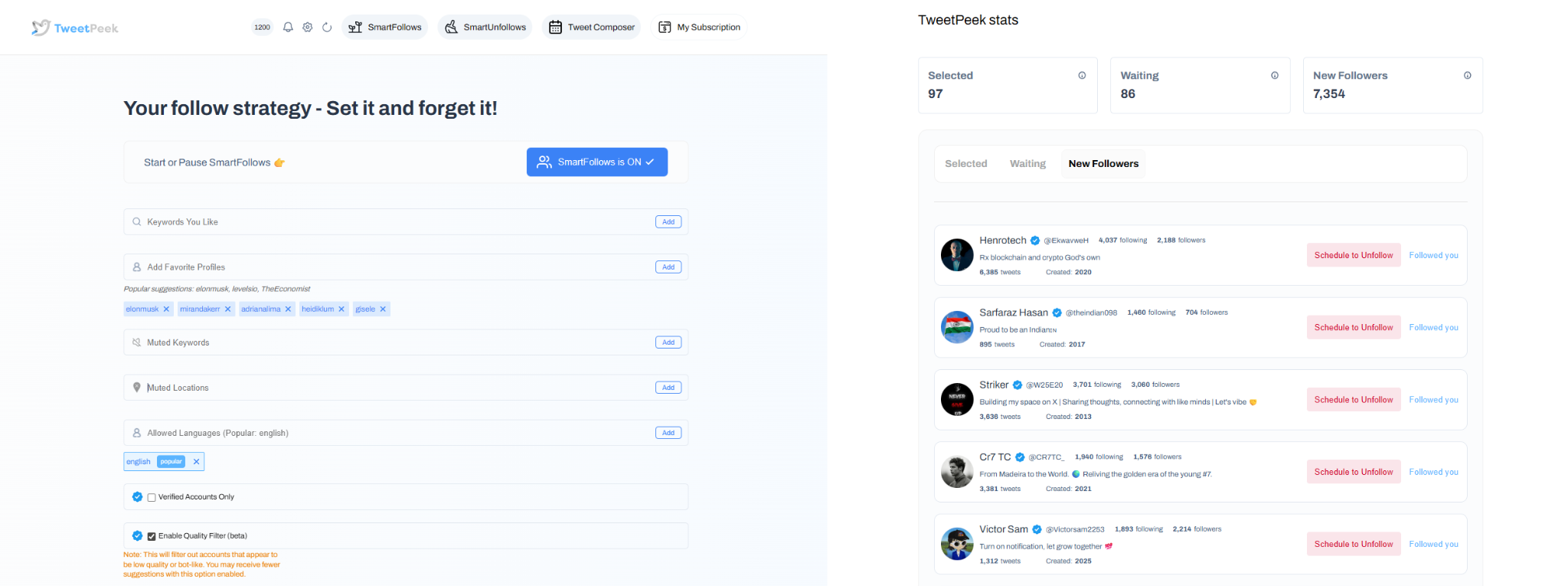
Smart Follows is designed to help you grow your audience by following people who match what you actually care about, and then cleaning up automatically if they don’t engage back.
What Smart Follows does
- Automatically follows people who match your interests
- If they don’t engage back, Smart Follows unfollows them for you
How it helps you
- Find relevant people to follow
- Find people who are likely to engage
- Find people who are likely to follow you back
- Targeting controls you can use
- Keywords you like
- Favorite Profiles
- Mute Keywords
- Locations
- Languages
- Option to only follow verified accounts (if enabled)
Transparency (so you’re not “blind-following”)
- You can see accounts selected to be followed
- You can see accounts that already followed back
Smart Unfollows
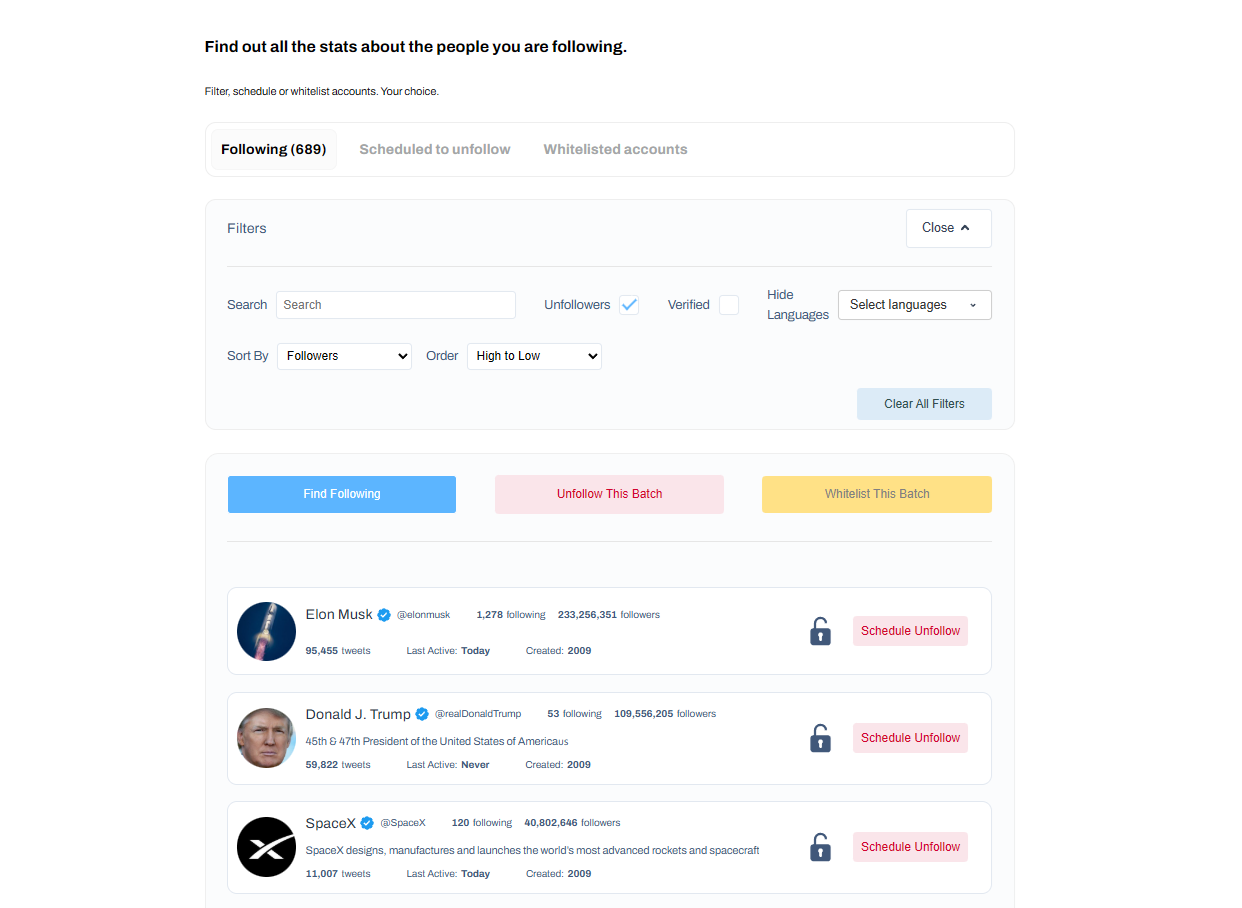
Smart Unfollows is your cleanup layer, so your following list stays meaningful instead of turning into a mess over time.
What Smart Unfollows helps you do
- See who isn’t following you back and decide to engage or unfollow
- Easily find people who aren’t following you back
Filtering + sorting (to find the right people fast)
- Search accounts
- Filter: unfollowers, verified, languages
- Sort: followers, following, last active, tweets count (low→high / high→low)
Actions
- Batch unfollow results
- Whitelist accounts so they will never be unfollowed
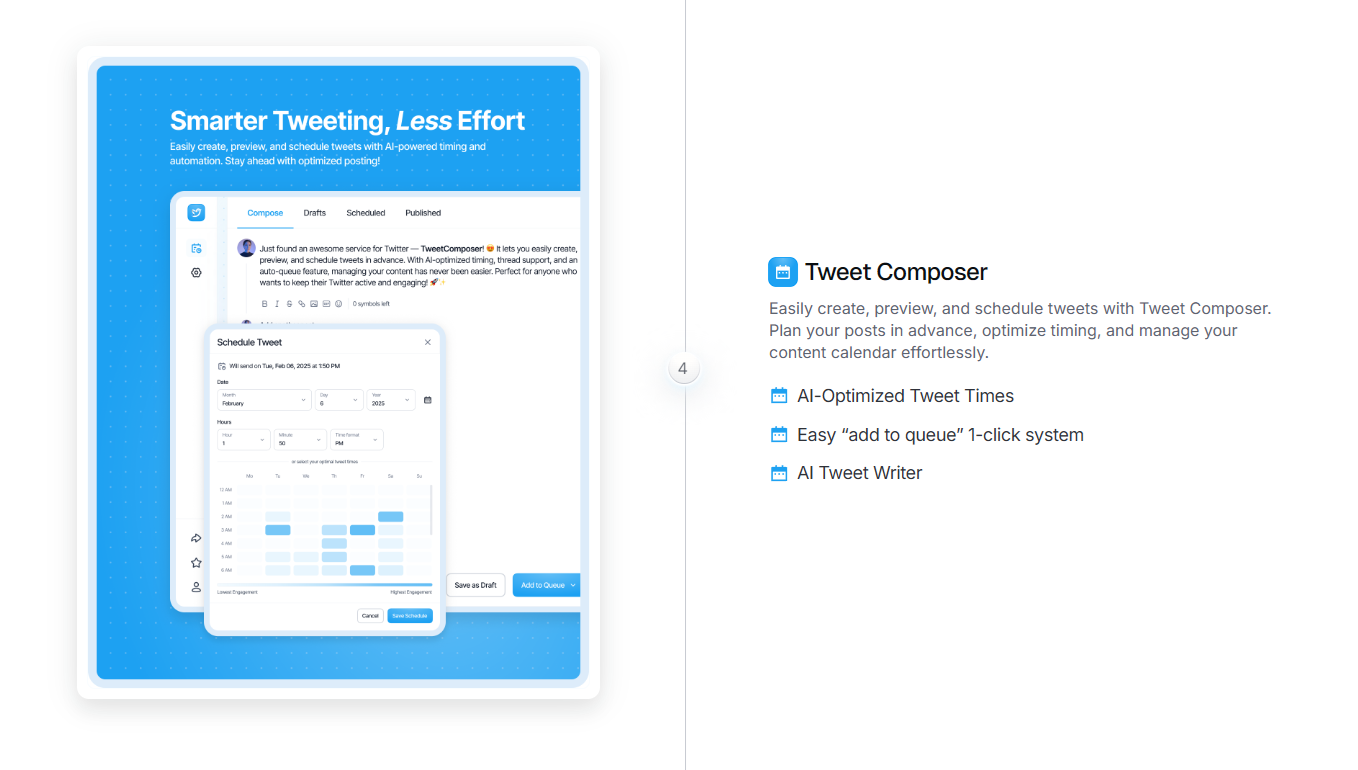
Scheduling/content (secondary, but useful)
To stay consistent, TweetPeek also supports content workflow:
- Create, preview, and schedule posts
- Light AI writing support to help draft or polish posts inside your workflow
Why TweetPeek stands out
What makes TweetPeek different is the extension-first workflow: you’re managing growth directly inside X instead of bouncing between tools and tabs. Its Smart Follows and Smart Unfollows are built to keep your network relevant, grow when it makes sense, and clean up when it doesn’t, while still giving you visibility and control. And because consistency matters, the built-in scheduling helps you maintain momentum without over-automating. The best results come from using it responsibly: keep actions steady, avoid aggressive behavior, and use whitelists and targeting controls so your growth stays intentional.
Tweepi (Best for recommendation-style growth and cleanup)

Tweepi overview
Tweepi is a Twitter/X growth tool that focuses on helping you discover and engage with people through targeted setup, often built around hashtags, competitor accounts, and user targeting, plus cleanup tools and follower stats.
How Tweepi’s growth flow typically works
- You set up targeting (for example: hashtags and specific accounts in your niche)
- The system surfaces recommended users and actions
- You work through those suggestions to grow and maintain your account
What Tweepi is strong at
Discovery + recommendations
- Finds users and tweets based on your targeting setup
- Helps you identify accounts more likely to match your niche
Engagement suggestions
Many recommendation-style tools don’t only suggest follows, they may also surface actions like replying, liking, or retweeting so you can get noticed in active conversations.
Cleanup + follower management
- Helps you clean up irrelevant, undesirable, or inactive accounts
- Often paired with stats so you can understand your following and follower quality better
Filters that matter
Tools like Tweepi commonly let you narrow results by things like language and location so you’re not targeting the wrong audience.
TweetPeek vs Tweepi: Feature comparison (what actually matters)
1) Workflow style: extension vs dashboard
- TweetPeek: Built for “in-the-moment” actions inside X (browser extension workflow).
- Tweepi: More of a structured growth workflow through a tool interface and recommendations.
Choose based on how you work:
If you’re already spending time inside X daily, an extension tends to feel smoother. If you prefer batching growth tasks in one place, a dashboard flow can feel cleaner.
2) Follow growth: targeting and relevance
- TweetPeek: Emphasizes targeted growth through Smart Follows with strong controls (keywords, profiles, mute keywords, locations, languages, optional verified-only).
- Tweepi: Emphasizes discovery through targeting setups like hashtags and user-based monitoring to surface relevant people and actions.
3) Cleanup: non-followers, sorting, and control
- TweetPeek: Strong “follow hygiene” focus with Smart Unfollows, filters, sorting, batch actions, and whitelisting.
- Tweepi: Cleanup tools plus stats, useful if you want more of an account health view alongside cleanup.
4) Consistency: staying active without burning out
- TweetPeek: Adds light scheduling/preview so you can stay consistent without making content the main job of the tool.
- Tweepi: Typically leans more toward growth actions and recommendations; content scheduling may not be the core focus.
Pricing, trials, and what “value” really means
Both tools are positioned with:
- A way to try before fully committing (free trial)
- Paid plans for higher usage or more features
- Different pricing levels depending on what you need
Practical way to decide
- If your main goal is follow growth + cleanup inside X, you’ll usually get more value from the tool that makes those actions easiest to repeat.
- If your main goal is recommendation-driven discovery with structured targeting, you’ll care more about how good the suggestions are and how much time they save you.
Platforms, support, and setup (quick check)
Platforms
Both are intended to work across common setups (desktop and mobile-friendly usage depending on your workflow), but the key difference is still:
- TweetPeek: browser extension experience
- Tweepi: web-tool/dashboard experience
Support and learning
Both are typically positioned with multiple support options (like online help and guidance) and common training formats (docs, webinars, etc.). If support is important to you, it’s worth checking which one is more responsive for your time zone.
Who should choose TweetPeek vs Tweepi?
Choose TweetPeek if you…
- Want a browser extension for X you can use while you’re actually on the platform
- Care most about Smart Follows (targeted growth) and Smart Unfollows (clean follow management)
- Want visibility and control (see selected accounts, see who followed back, whitelist important accounts)
- Prefer steady, responsible growth instead of aggressive automation
- Like having light scheduling so consistency is easier
Choose Tweepi if you…
- Prefer a more structured growth workflow (recommendations + actions)
- Want discovery driven by hashtags and account targeting
- Care about cleanup plus stats to understand follower quality
- Like batching growth tasks instead of doing them inside X
Alternatives to TweetPeek and Tweepi (if you want more options)
If neither tool fits your style, here are a few popular categories of alternatives to explore:
- Audience research and search tools (great for finding accounts in your niche)
- Analytics tools (better reporting and performance tracking)
- Follower cleanup tools (focused purely on follow/unfollow hygiene)
- Full social media management suites (scheduling-first, often less focused on follow growth)
Some names you may see in this space include: Twesocial, followerwonk, Owlead, Commun.it, SocialDog, Twitonomy, FollowersAnalysis, Combin, and Hypegrowth.
Best practices: use follow tools responsibly (so you don’t nuke your account)
No matter which tool you choose, the safest long-term approach looks like this:
- Keep follow/unfollow actions steady and non-aggressive
- Prioritize relevance over volume
- Whitelist people you genuinely want to keep
- Use targeting controls (keywords, profiles, language, location) so your network stays aligned
- Don’t rely on automation alone, real engagement still matters
Conclusion: TweetPeek vs Tweepi - which should you pick?
If you want the simplest day-to-day workflow for growth and cleanup, TweetPeek vs Tweepi usually comes down to where you want to do the work.
- If you want a browser extension that helps you grow with Smart Follows and stay clean with Smart Unfollows, plus a little scheduling to stay consistent, TweetPeek is the stronger fit for hands-on creators who live inside X.
- If you want a more traditional growth tool experience driven by recommendations, targeting setups, and cleanup/stats, Tweepi can be a better match.
If you’re leaning toward an extension-first workflow, start with TweetPeek and set up your targeting controls early, keywords, favorite profiles, and mute keywords, so your Smart Follows and Smart Unfollows stay aligned with the audience you actually want.

.png)
.png)
